n89f1d1w.exe ,aqoeerw.exe
Files size 126,656 bytes
MD5: 0x59410CCC9572CE2851827C23336A174C
SHA-1: 0x3E23464479F3BB7F48980214D6976540F54B273A
Files Created
C:\WINDOWS\system32\aqoeerw.exe
C:\WINDOWS\system32\bnmkue0.dll (0-9)
X:\n89f1d1w.exe
X:\autorun.inf
Registry Modifications
Key Added
HKLM\SOFTWARE\Classes\CLSID\MADOWN
Value Added
HKLM\SOFTWARE\Classes\CLSID\MADOWN\
urlinfo : awscjm.r
HKCU\Software\Microsoft\Windows\CurrentVersion\Run\
coolsos : %System%\aqoeerw.exe
Values modified
HKLM\SOFTWARE\Microsoft\Windows\CurrentVersion\Explorer\Advanced\ Folder\Hidden\SHOWALL\CheckedValue: 0x00000000 HKCU\Software\Microsoft\Windows\CurrentVersion\Explorer\Advanced\
Hidden: 0x00000002
HKCU\Software\Microsoft\Windows\CurrentVersion\Explorer\Advanced\
ShowSuperHidden: 0x00000000
HKCU\Software\Microsoft\Windows\CurrentVersion\Policies\Explorer\ NoDriveTypeAutoRun: 0x00000091
วิธีแก้ไข
1. Run PeeTechFix-PSW.OnlineGame 2.05
Download : Run PeeTechFix-PSW.OnlineGame 2.05
2. Download ไฟล์ Fix-n89f1d1w.bat แล้ว DuobleClick หรือ คลิกขวา->Run
Download : Fix-n89f1d1w.bat
ไวรัส Black Screen with mouse Trojan
ชื่อไฟล์ไวรัส
cwcsi.old , exjb.bak
Win32/Daonal.L (Detect by NOD32)
Trojan-PSW.Win32.Kates.j (Detect by Kaspersky Lab)
Files created
C:\WINDOWS\cwcsi.old
รายละเอียดไฟล์
cwcsi.old
File size18,432 bytes
MD5: 89F34BE523093E7AF4FD0C4D4FF10B6E
SHA-1: 6FDCBA3C13899D43A205DDF058D1CF4C526DDE4F
Registry Modifications
Values Added
HKLM\SOFTWARE\Microsoft\Windows NT\CurrentVersion\Drivers32
midi9 : "%System%\..\cwcsi.old 0yAAAAAAAA" (Random name path and file)
path และ ชื่อไฟล์อาจเปลี่ยนชื่อเป็นชื่ออื่นๆครับ
HKLM\SOFTWARE\Microsoft\Windows NT\CurrentVersion\Windows
LoadAppInit_DLLs = 0x00000001
--------------------------------------------------------------------------
exjb.bak
File size 18,432 bytes
MD5: 60142096DE91560CF0BA7D5096CAC70E
SHA-1: CD92B24B0597321DDB5403154635DB05B883572F
File Created
C:\WINDOWS\exjb.bak
Registry Modifications
Values Added
HKLM\SOFTWARE\Microsoft\Windows NT\CurrentVersion\Drivers32
midi9 = "%System%\..\exjb.bak 0yAAAAAAAA" (Random name path and file)
path และ ชื่อไฟล์อาจเปลี่ยนชื่อเป็นชื่ออื่นๆได้ครับ
HKLM\SOFTWARE\Microsoft\Windows NT\CurrentVersion\Windows
LoadAppInit_DLLs = 0x00000001
~.exe
File size: 16384 bytes
MD5 : 91cd1690546857dbadec1353dd9baf99
SHA1 : f926e07272a8bcfe070eb7044a3e238de49c74a3
C:\WINDOWS\system32\~.exe
------------------------------------------------------------------------
* path อาจอยู่ในตำแหน่ง อื่นๆ หรือชื่ออื่นๆ เช่น
C:\Documents and Settings\[UserName]\Local Settings\Temp\[Random]\bibcfbk.tmp
C:\Windows\rocfnx.bak
C:\Windows\WRPOP.OLD
C:\Windows\ectsyil.bak
C:\Windows\qkpf.old
C:\Windows\fmnvk.old
C:\Windows\system32\~.exe
C:\Windows\system32\emqmu.bak
อาการ : เครื่องคอมพิวเตอร์ ยังคงเปิดเครื่องได้ บู๊ตเข้าวินโดว์ได้ แต่สุดท้าย จะแสดงแต่หน้าจอพื้นสีดำและมีลูกศรเมาส์ให้ดูต่างหน้า ไม่มีไอคอนใดๆ ปรากฎให้เห็น แม้จะสามารถขยับเมาส์ได้ตามที่เราเคลื่อนมือสั่งการ หากว่าเราลองบู๊ตเครื่องเพื่อเข้า Safe Mode ก็จะมีลักษณะเดียวกัน
วิธีกำจัด virus : Win32/Daonal.L
วิธีที่ 1 :
1. ถอด Haddisk ที่ติด virus นี้ไป Scan เครื่องที่มี Antivirus update
เนื่องจาก virus ได้ random ที่ไปเรื่อย ไม่เจาะจง โดยจะเลือกใช้ NOD32 , Kaspersky หรือ Avira ก็ได้ครับ
2. เมื่อเข้า Windows ได้แล้วให้ไปตรวจสอบ Registry ด้วยครับว่า Key Driver32 ยังมี midi9 อยู่หรือไม่
ถ้ามีให้ Delete ทิ้งด้วยครับ
"HKLM\Sofeware\Microsoft\Windows NT\CurrentVersion\Drivers32 \midi9"
วิธีที่ 2 :
. หาแผ่น Hiren boot CD มา boot โดยเลือก boot ที่ Mini PE หรือ Mini XP
หรือ Download จาก Web นี้ครับ
http://www.hirensbootcd.net/ (185.80 MB)
http://d2.hirensbootcd.net/Hirens.BootCD.10.0.zip
2. เข้าไปที่ start > run พิมพ์ regedit เข้าไปที่ HKEY_LOCAL_MACHINE (HKLM)
3. เลือกที่เมนู File เลือกที่ load hive
4.ไปที่ c:\windows\system32\config แล้วเลือกไฟล์ ชื่อ software แล้วตั้งชื่อไฟล์เป็นชื่ออะไรก็ได้ครับ เช่น Fix
5. จากนั้นเข้าไปที่ HKLM\Fix\Microsoft\Windows NT\CurrentVersion\Drivers32
หา ค่า value ที่ชื่อ midi9 เมื่อเจอแล้วให้ delete value นี้ทิ้งไป
ตัวอย่าง "C:\DOCUME~1\user\LOCALS~1\Temp\..\bibcfbk.tmp 0yAAAAAAAA"

6. Restart เครื่อง 1 ครั้ง ดูว่าเข้า windows ได้หรือไม่
7. ใช้ ATF cleanner ลบ Temp ต่าง และUpdate Antivirus แล้ว Scan ทั้งระบบ
วิธีที่ 3 : (ผมใช้วิธีนี้ ของ free ครับ ซึ่งขนาดไฟล์ เพียงประมาณ 58 MB เท่านั้น)
1. Dowmload
Avira AntiVir Rescue System Date: 26 Oct 2009 - Version : 20091026191731
http://dlpro.antivir.com/package/rescue_system/common/en/rescue_system-common-en.exe
หรือ
Avira AntiVir Rescue SystemDate: 26 Oct 2009 - Version : 20091026191731
http://dlpro.antivir.com/package/rescue_system/common/en/rescue_system-common-en.iso
2. ผมใช้ตัวที่ เป็น exe โดย ใส่แผ่น CD เปล่า แล้ว double click ไฟล์ rescue_system-common-en.exe
จากนั้นclick ปุ่ม Burn CD

เมื่อฺ Burn CD เรียบร้อยแล้วให้ Restart โดยให้ boot จาก CD จะขึ้นหน้าต่างดังภาพ
โดยเลือก Boot :1 (1 Boot Avira AntiVir Rescue System)

4.จะขึ้นหน้าต่างดังภาพ ให้ เลือก Virus Scanner แล้ว Click ปุ่ม Start Scanner

5. เมื่อ Scan เรียบร้อยแล้วกดปุ่ม Restart เครื่อง
*เมื่อเข้า windows ได้แล้ว ให้ update Antivirus ให้เป็นปัจจุบัน
วิธีที่ 4 :
1. Download Dr.Web Live CD (69.8 MB) ไม่ใหญ่มาก พอๆกับ Avira และ Free เหมือนกัน
ftp://ftp.drweb.com/pub/drweb/livecd/20091028042001/minDrWebLiveCD-5.0.0.iso
2. Burn ใส่แผ่น CD แล้วนำไป Boot


3. Click Start ตรงปุ่มด้านซ้ายล่างสีเขียว เลือก Dr.Web Scanner แล้ว เลือก Drive แล้วทำการ Scan

4. เมื่อ Scan เรียบร้อยแล้วให้ Restart เครื่อง และเมื่อเข้า Windows ได้แล้วให้ Update ฐานข้อมูล virus ให้เป็นปัจจุบันด้วยครับ
วิธีที่ 5 : วิธีนี้จะเหมือนๆกับวิธีที่ใช้กับ Hiren Boot
Download Active@ Boot Disk (Win Edition) Demo 4.1.8 (126 MB)
http://software.lsoft.net/BootDiskDemo-Setup.exe
http://download2.lsoft.net/BootDiskDemo-Setup.exe
1. เมื่อ Download และ Set up โปรแกรม เรียบร้อยแล้ว และ Register ด้วยชื่อด้านล่างนี้ครับ
Registered Name: PeeTech thailand
Registration Key: 0NBBBJ-DWZ1DM-VUNRCJ-UZPUJZ-JMY6TX
หรือใครจะเลือก Register ผ่าน Website ก็ได้โดยเลือก Get key for free
2. เมื่อเปิดหน้าต่าง Active@ Boot Disk Creator เลือกที่ menu Boot Disk Win Edition

3. เลือกที่ Win CD/DVD Boot Disk โดยใส่แผ่น CD/DVD แล้วเลือก Create !

จะขึ้นหน้าต่างดังภาพ จากนั้นให้กดป่ม Burn ISO

4. เมื่อได้แผ่น Active@ Boot Disk แล้วให้ restart เครื่องโดยเลือก Boot จาก CD/DVD จะขึ้นหน้าต่าง
Windows is loading files ให้รอสักครู่จะขึ้นหน้าต่างดังภาพ แล้วกดปุ่ม OK หรือใครจะ Set ค่าก็ได้ครับ

เมื่อ OK แล้วจะเข้าสู่หน้าจอ Windows ของ Active@ Boot Disk

5. ให้เลือก ที่ เมนู Start (@ ) ซ้ายมือด้านล่าง เลือกไปที่ Utilities > Registry Editor จะขึ้นหน้าต่างดังภาพด้านล่าง Click ที่ HKEY_LACAL_MACHINE เลือกที่ Menu File เลือก Load Hive

เลือกไปที่ C:\windows\system32\config แล้วเลือกไฟล์ ชื่อ software แล้วตั้งชื่อไฟล์ Fix_BlackScreen_Virus
5. จากนั้นเข้าไปที่ HKLM\Fix_BlackScreen_Virus\Microsoft\Windows NT\CurrentVersion\
Drivers32 Delete ค่า Value ที่ชื่อ midi9 นี้ทิ้งไป

6. Restart และเมื่อเข้า Windows ได้แล้วให้ Update antivirus แล้ว Scan อีกครั้ง
cwcsi.old , exjb.bak
Win32/Daonal.L (Detect by NOD32)
Trojan-PSW.Win32.Kates.j (Detect by Kaspersky Lab)
Files created
C:\WINDOWS\cwcsi.old
รายละเอียดไฟล์
cwcsi.old
File size18,432 bytes
MD5: 89F34BE523093E7AF4FD0C4D4FF10B6E
SHA-1: 6FDCBA3C13899D43A205DDF058D1CF4C526DDE4F
Registry Modifications
Values Added
HKLM\SOFTWARE\Microsoft\Windows NT\CurrentVersion\Drivers32
midi9 : "%System%\..\cwcsi.old 0yAAAAAAAA" (Random name path and file)
path และ ชื่อไฟล์อาจเปลี่ยนชื่อเป็นชื่ออื่นๆครับ
HKLM\SOFTWARE\Microsoft\Windows NT\CurrentVersion\Windows
LoadAppInit_DLLs = 0x00000001
--------------------------------------------------------------------------
exjb.bak
File size 18,432 bytes
MD5: 60142096DE91560CF0BA7D5096CAC70E
SHA-1: CD92B24B0597321DDB5403154635DB05B883572F
File Created
C:\WINDOWS\exjb.bak
Registry Modifications
Values Added
HKLM\SOFTWARE\Microsoft\Windows NT\CurrentVersion\Drivers32
midi9 = "%System%\..\exjb.bak 0yAAAAAAAA" (Random name path and file)
path และ ชื่อไฟล์อาจเปลี่ยนชื่อเป็นชื่ออื่นๆได้ครับ
HKLM\SOFTWARE\Microsoft\Windows NT\CurrentVersion\Windows
LoadAppInit_DLLs = 0x00000001
~.exe
File size: 16384 bytes
MD5 : 91cd1690546857dbadec1353dd9baf99
SHA1 : f926e07272a8bcfe070eb7044a3e238de49c74a3
C:\WINDOWS\system32\~.exe
------------------------------------------------------------------------
* path อาจอยู่ในตำแหน่ง อื่นๆ หรือชื่ออื่นๆ เช่น
C:\Documents and Settings\[UserName]\Local Settings\Temp\[Random]\bibcfbk.tmp
C:\Windows\rocfnx.bak
C:\Windows\WRPOP.OLD
C:\Windows\ectsyil.bak
C:\Windows\qkpf.old
C:\Windows\fmnvk.old
C:\Windows\system32\~.exe
C:\Windows\system32\emqmu.bak
อาการ : เครื่องคอมพิวเตอร์ ยังคงเปิดเครื่องได้ บู๊ตเข้าวินโดว์ได้ แต่สุดท้าย จะแสดงแต่หน้าจอพื้นสีดำและมีลูกศรเมาส์ให้ดูต่างหน้า ไม่มีไอคอนใดๆ ปรากฎให้เห็น แม้จะสามารถขยับเมาส์ได้ตามที่เราเคลื่อนมือสั่งการ หากว่าเราลองบู๊ตเครื่องเพื่อเข้า Safe Mode ก็จะมีลักษณะเดียวกัน
วิธีกำจัด virus : Win32/Daonal.L
วิธีที่ 1 :
1. ถอด Haddisk ที่ติด virus นี้ไป Scan เครื่องที่มี Antivirus update
เนื่องจาก virus ได้ random ที่ไปเรื่อย ไม่เจาะจง โดยจะเลือกใช้ NOD32 , Kaspersky หรือ Avira ก็ได้ครับ
2. เมื่อเข้า Windows ได้แล้วให้ไปตรวจสอบ Registry ด้วยครับว่า Key Driver32 ยังมี midi9 อยู่หรือไม่
ถ้ามีให้ Delete ทิ้งด้วยครับ
"HKLM\Sofeware\Microsoft\Windows NT\CurrentVersion\Drivers32 \midi9"
วิธีที่ 2 :
. หาแผ่น Hiren boot CD มา boot โดยเลือก boot ที่ Mini PE หรือ Mini XP
หรือ Download จาก Web นี้ครับ
http://www.hirensbootcd.net/ (185.80 MB)
http://d2.hirensbootcd.net/Hirens.BootCD.10.0.zip
2. เข้าไปที่ start > run พิมพ์ regedit เข้าไปที่ HKEY_LOCAL_MACHINE (HKLM)
3. เลือกที่เมนู File เลือกที่ load hive
4.ไปที่ c:\windows\system32\config แล้วเลือกไฟล์ ชื่อ software แล้วตั้งชื่อไฟล์เป็นชื่ออะไรก็ได้ครับ เช่น Fix
5. จากนั้นเข้าไปที่ HKLM\Fix\Microsoft\Windows NT\CurrentVersion\Drivers32
หา ค่า value ที่ชื่อ midi9 เมื่อเจอแล้วให้ delete value นี้ทิ้งไป
ตัวอย่าง "C:\DOCUME~1\user\LOCALS~1\Temp\..\bibcfbk.tmp 0yAAAAAAAA"
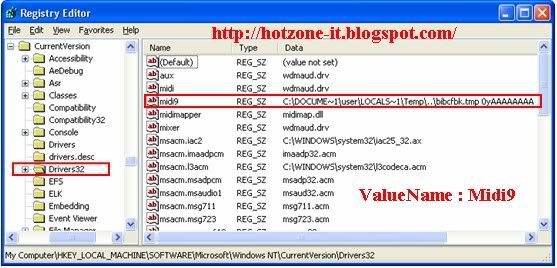
6. Restart เครื่อง 1 ครั้ง ดูว่าเข้า windows ได้หรือไม่
7. ใช้ ATF cleanner ลบ Temp ต่าง และUpdate Antivirus แล้ว Scan ทั้งระบบ
วิธีที่ 3 : (ผมใช้วิธีนี้ ของ free ครับ ซึ่งขนาดไฟล์ เพียงประมาณ 58 MB เท่านั้น)
1. Dowmload
Avira AntiVir Rescue System Date: 26 Oct 2009 - Version : 20091026191731
http://dlpro.antivir.com/package/rescue_system/common/en/rescue_system-common-en.exe
หรือ
Avira AntiVir Rescue SystemDate: 26 Oct 2009 - Version : 20091026191731
http://dlpro.antivir.com/package/rescue_system/common/en/rescue_system-common-en.iso
2. ผมใช้ตัวที่ เป็น exe โดย ใส่แผ่น CD เปล่า แล้ว double click ไฟล์ rescue_system-common-en.exe
จากนั้นclick ปุ่ม Burn CD
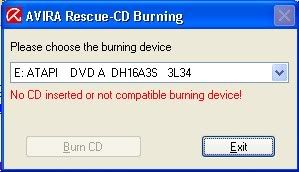
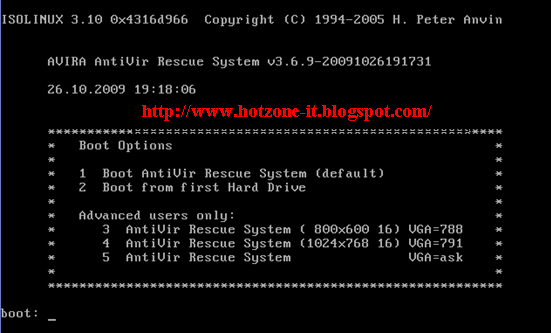
เมื่อฺ Burn CD เรียบร้อยแล้วให้ Restart โดยให้ boot จาก CD จะขึ้นหน้าต่างดังภาพ
โดยเลือก Boot :1 (1 Boot Avira AntiVir Rescue System)
4.จะขึ้นหน้าต่างดังภาพ ให้ เลือก Virus Scanner แล้ว Click ปุ่ม Start Scanner
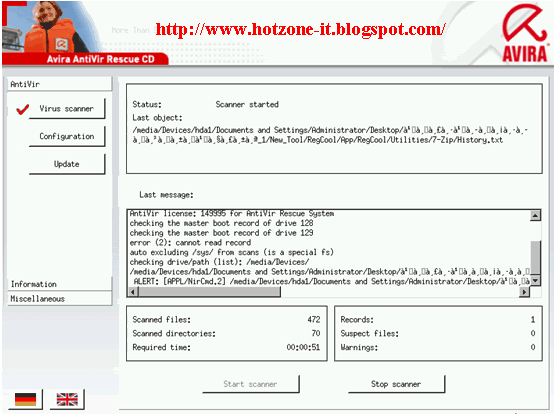
5. เมื่อ Scan เรียบร้อยแล้วกดปุ่ม Restart เครื่อง
*เมื่อเข้า windows ได้แล้ว ให้ update Antivirus ให้เป็นปัจจุบัน
วิธีที่ 4 :
1. Download Dr.Web Live CD (69.8 MB) ไม่ใหญ่มาก พอๆกับ Avira และ Free เหมือนกัน
ftp://ftp.drweb.com/pub/drweb/livecd/20091028042001/minDrWebLiveCD-5.0.0.iso
2. Burn ใส่แผ่น CD แล้วนำไป Boot
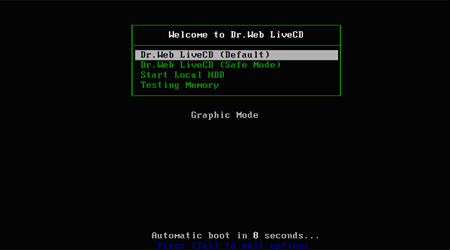
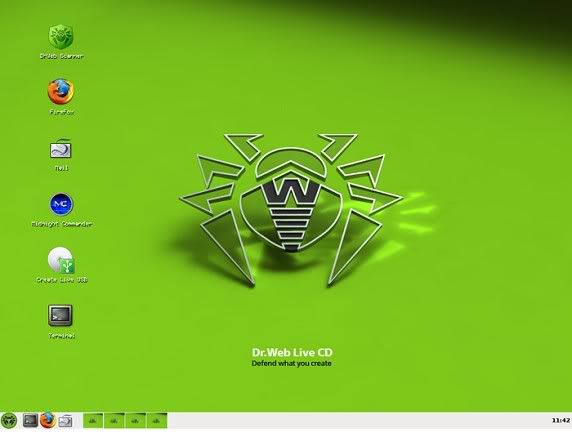
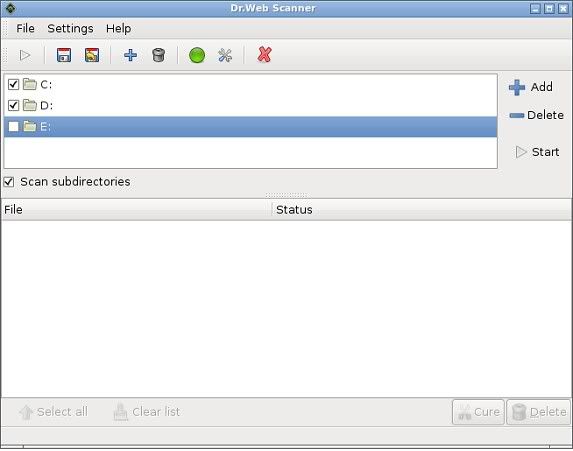
4. เมื่อ Scan เรียบร้อยแล้วให้ Restart เครื่อง และเมื่อเข้า Windows ได้แล้วให้ Update ฐานข้อมูล virus ให้เป็นปัจจุบันด้วยครับ
วิธีที่ 5 : วิธีนี้จะเหมือนๆกับวิธีที่ใช้กับ Hiren Boot
Download Active@ Boot Disk (Win Edition) Demo 4.1.8 (126 MB)
http://software.lsoft.net/BootDiskDemo-Setup.exe
http://download2.lsoft.net/BootDiskDemo-Setup.exe
1. เมื่อ Download และ Set up โปรแกรม เรียบร้อยแล้ว และ Register ด้วยชื่อด้านล่างนี้ครับ
Registered Name: PeeTech thailand
Registration Key: 0NBBBJ-DWZ1DM-VUNRCJ-UZPUJZ-JMY6TX
หรือใครจะเลือก Register ผ่าน Website ก็ได้โดยเลือก Get key for free
2. เมื่อเปิดหน้าต่าง Active@ Boot Disk Creator เลือกที่ menu Boot Disk Win Edition
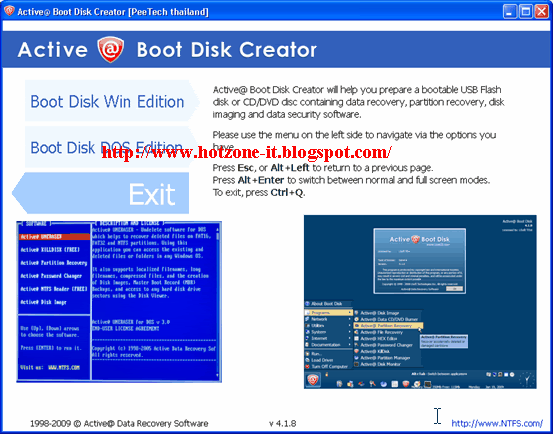
3. เลือกที่ Win CD/DVD Boot Disk โดยใส่แผ่น CD/DVD แล้วเลือก Create !
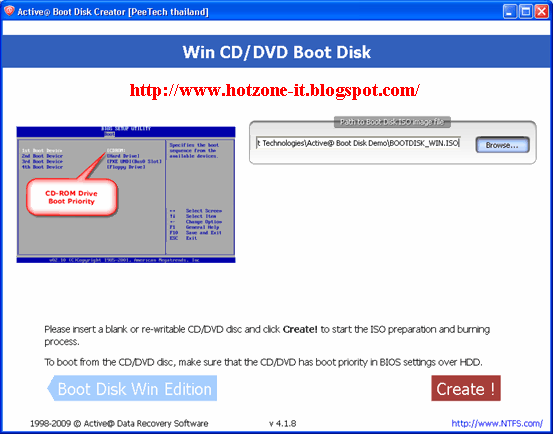
จะขึ้นหน้าต่างดังภาพ จากนั้นให้กดป่ม Burn ISO
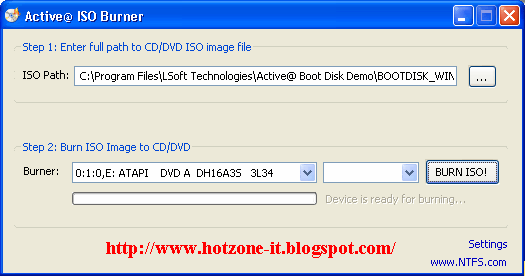
4. เมื่อได้แผ่น Active@ Boot Disk แล้วให้ restart เครื่องโดยเลือก Boot จาก CD/DVD จะขึ้นหน้าต่าง
Windows is loading files ให้รอสักครู่จะขึ้นหน้าต่างดังภาพ แล้วกดปุ่ม OK หรือใครจะ Set ค่าก็ได้ครับ
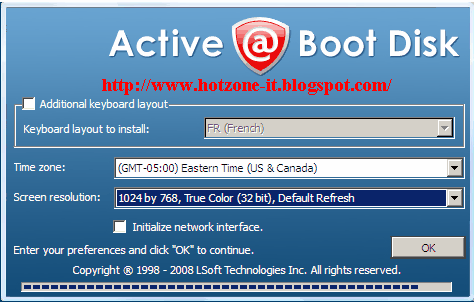
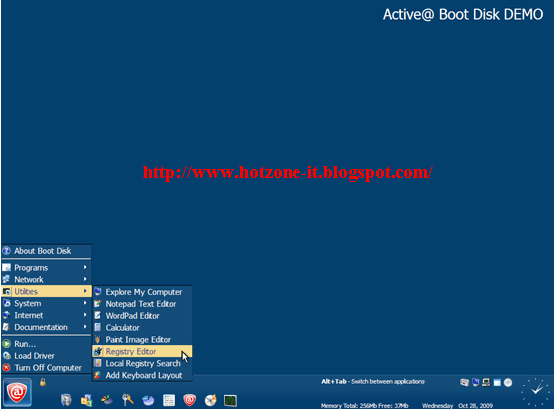
5. ให้เลือก ที่ เมนู Start (@ ) ซ้ายมือด้านล่าง เลือกไปที่ Utilities > Registry Editor จะขึ้นหน้าต่างดังภาพด้านล่าง Click ที่ HKEY_LACAL_MACHINE เลือกที่ Menu File เลือก Load Hive
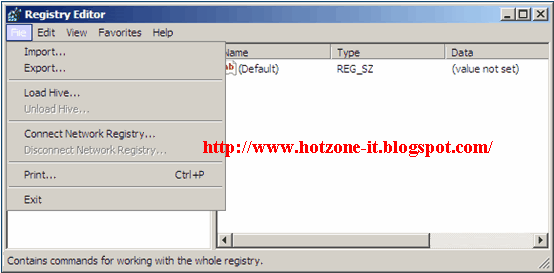
เลือกไปที่ C:\windows\system32\config แล้วเลือกไฟล์ ชื่อ software แล้วตั้งชื่อไฟล์ Fix_BlackScreen_Virus
5. จากนั้นเข้าไปที่ HKLM\Fix_BlackScreen_Virus\Microsoft\Windows NT\CurrentVersion\
Drivers32 Delete ค่า Value ที่ชื่อ midi9 นี้ทิ้งไป
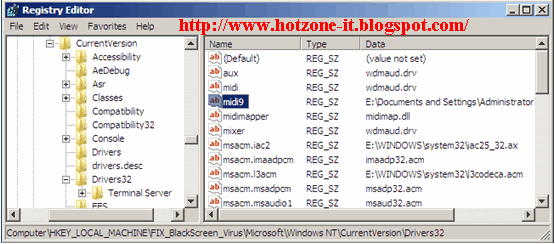
6. Restart และเมื่อเข้า Windows ได้แล้วให้ Update antivirus แล้ว Scan อีกครั้ง
ไวรัส Ahnrpta.exe
ประเภท: Trojan
ไวรัสจะเก็บไฟล์ไว้ที่ C:\Windows\Ahnrpta.exe
อาการ
- CPU Run 100% ทำให้เครื่องช้า
- ใช้โปรแกรม Antivirus ไม่ได้
วิธีแก้
- ใช้ Task manager ปิดการทำงาน โปรเซส Ahnrpta.exe
- ใช้ StopZilla Spywareremover ยังไม่เคยลองครับ
หรือ
1. Download REG UNLOCKER
2. Execute reg unlocker (select all options) and as quick as you can, open the task manager (CTR+ ALT +DEL) and kill the process EXPLORER.EXE (don’t worry if all programs start closing and you end with the task manager alone, that is the point)
3. Using the task manager kill the process AhnRpta.exe which is the virus of course you’ll have to do this dozens of times thru this tutorial, because it keeps starting itself again
4. run REGUNLOCKER again. With the task manager go to Applications–> New Task and write “explorer” (without quotes) Remember step 4. Now in the explorer window go to Tools — Folder Options — View and select “show hidden files and folders” accept and go to the task manager and kill “explorer.exe” there.
5. Dont forget step 4. Now, you only have open the task manager in the tab applications click New Task and write
“msconfig” without quotes, (never forget step 4) go to the start tab and look for olhrwef, deselect it, apply, but don’t restart the system, no yet.(step 4), now in the task manager, go to applications – New Task and write “regedit” without quotes. Browse the following path
* HKEY_LOCAL_MACHINE\SOFTWARE\Classes\CLSI… F-882A-4526-8C08-51278EA437C1}
* HKEY_LOCAL_MACHINE\SOFTWARE\Classes\CLSI… F-882A-4526-8C08-51278EA437C1}\InprocSer…
* HKEY_LOCAL_MACHINE\SOFTWARE\Classes\CLSI… F-882A-8C08-4526-51278EA437C1}
the last part can vary a little in each computer, but the firts dozen of numbers will be the same. Delete the keys (I mean, delete the last folder for example {BB4C402F-882A-4526-8C08-51278EA437C1} don’t delete the root folders or you will completly screw up your system.
also browse to
# [HKEY_LOCAL_MACHINE\SOFTWARE\Microsoft\W... entVersion\Explorer\ShellExecuteHooks]
* {BB4C402F-882A-4526-8C08-51278EA437C1} = “hook dll rising”
and delete the key… be careful in this part you don’t have to delete the complete folder, in the right pane look for the “hook dll rising” part and delete that one only.
Don’t forget step 4.
You can closes the registry and go back to the task manager. New task, click browse and go to
“c:\windows\” you will find the file “AhnRpta.exe” delete it.
Now go to “C:\WINDOWS\system32″ look for the file “olhrwef” and delete it (note: I didn’t found it in my pc but this part was in the original tutorial that I followed).
Also delete the following files in that folder
afmain0.dll
afmain1.dll
afmain2.dll
ไวรัสจะเก็บไฟล์ไว้ที่ C:\Windows\Ahnrpta.exe
อาการ
- CPU Run 100% ทำให้เครื่องช้า
- ใช้โปรแกรม Antivirus ไม่ได้
วิธีแก้
- ใช้ Task manager ปิดการทำงาน โปรเซส Ahnrpta.exe
- ใช้ StopZilla Spywareremover ยังไม่เคยลองครับ
หรือ
1. Download REG UNLOCKER
2. Execute reg unlocker (select all options) and as quick as you can, open the task manager (CTR+ ALT +DEL) and kill the process EXPLORER.EXE (don’t worry if all programs start closing and you end with the task manager alone, that is the point)
3. Using the task manager kill the process AhnRpta.exe which is the virus of course you’ll have to do this dozens of times thru this tutorial, because it keeps starting itself again
4. run REGUNLOCKER again. With the task manager go to Applications–> New Task and write “explorer” (without quotes) Remember step 4. Now in the explorer window go to Tools — Folder Options — View and select “show hidden files and folders” accept and go to the task manager and kill “explorer.exe” there.
5. Dont forget step 4. Now, you only have open the task manager in the tab applications click New Task and write
“msconfig” without quotes, (never forget step 4) go to the start tab and look for olhrwef, deselect it, apply, but don’t restart the system, no yet.(step 4), now in the task manager, go to applications – New Task and write “regedit” without quotes. Browse the following path
* HKEY_LOCAL_MACHINE\SOFTWARE\Classes\CLSI… F-882A-4526-8C08-51278EA437C1}
* HKEY_LOCAL_MACHINE\SOFTWARE\Classes\CLSI… F-882A-4526-8C08-51278EA437C1}\InprocSer…
* HKEY_LOCAL_MACHINE\SOFTWARE\Classes\CLSI… F-882A-8C08-4526-51278EA437C1}
the last part can vary a little in each computer, but the firts dozen of numbers will be the same. Delete the keys (I mean, delete the last folder for example {BB4C402F-882A-4526-8C08-51278EA437C1} don’t delete the root folders or you will completly screw up your system.
also browse to
# [HKEY_LOCAL_MACHINE\SOFTWARE\Microsoft\W... entVersion\Explorer\ShellExecuteHooks]
* {BB4C402F-882A-4526-8C08-51278EA437C1} = “hook dll rising”
and delete the key… be careful in this part you don’t have to delete the complete folder, in the right pane look for the “hook dll rising” part and delete that one only.
Don’t forget step 4.
You can closes the registry and go back to the task manager. New task, click browse and go to
“c:\windows\” you will find the file “AhnRpta.exe” delete it.
Now go to “C:\WINDOWS\system32″ look for the file “olhrwef” and delete it (note: I didn’t found it in my pc but this part was in the original tutorial that I followed).
Also delete the following files in that folder
afmain0.dll
afmain1.dll
afmain2.dll
สมัครสมาชิก:
บทความ (Atom)